| 123456789101112131415161718192021222324252627282930313233343536373839404142434445464748495051525354555657585960616263646566676869707172737475767778798081828384858687888990919293949596979899100101102103104105106107108109110111112113114115116117118119120121122123124125126127128129130131132133134135136137138139140141142143144145146147148149150151152153154155156157158159160161162163164165166167168169170171172173174175176177178179180181182183184185186187188189190191192193194195196197198199200201202203204205206207208209210211212213214215216217218219220221222223224225226227228229230231232233234235236237238239240241242243244245246247248249250251252253254255256257258259260261262263264265266267268269270271272273274275276277278279280281282283284285286287288289290291292293294295296297298299300301302303304305306307308309310311312313314315316317318319320321322323324325326327328329330331332333334335336337338339340341342343344345346347348349350351352353354355356357358359360361362363364365366367368369370371372373374375376377378379380381382383384385386387388389390391392393394395396397398399400401402 |
- Metadata-Version: 2.1
- Name: isort
- Version: 5.12.0
- Summary: A Python utility / library to sort Python imports.
- Home-page: https://pycqa.github.io/isort/
- License: MIT
- Keywords: Refactor,Lint,Imports,Sort,Clean
- Author: Timothy Crosley
- Author-email: timothy.crosley@gmail.com
- Requires-Python: >=3.8.0
- Classifier: Development Status :: 6 - Mature
- Classifier: Environment :: Console
- Classifier: Intended Audience :: Developers
- Classifier: License :: OSI Approved :: MIT License
- Classifier: Natural Language :: English
- Classifier: Programming Language :: Python
- Classifier: Programming Language :: Python :: 3
- Classifier: Programming Language :: Python :: 3.8
- Classifier: Programming Language :: Python :: 3.9
- Classifier: Programming Language :: Python :: 3.10
- Classifier: Programming Language :: Python :: 3.11
- Classifier: Programming Language :: Python :: 3
- Classifier: Programming Language :: Python :: 3 :: Only
- Classifier: Programming Language :: Python :: 3.10
- Classifier: Programming Language :: Python :: 3.11
- Classifier: Programming Language :: Python :: 3.8
- Classifier: Programming Language :: Python :: 3.9
- Classifier: Programming Language :: Python :: Implementation :: CPython
- Classifier: Programming Language :: Python :: Implementation :: PyPy
- Classifier: Topic :: Software Development :: Libraries
- Classifier: Topic :: Utilities
- Provides-Extra: colors
- Provides-Extra: pipfile-deprecated-finder
- Provides-Extra: plugins
- Provides-Extra: requirements-deprecated-finder
- Requires-Dist: colorama (>=0.4.3) ; extra == "colors"
- Requires-Dist: pip-api ; extra == "requirements-deprecated-finder"
- Requires-Dist: pip-shims (>=0.5.2) ; extra == "pipfile-deprecated-finder"
- Requires-Dist: pipreqs ; extra == "pipfile-deprecated-finder" or extra == "requirements-deprecated-finder"
- Requires-Dist: requirementslib ; extra == "pipfile-deprecated-finder"
- Requires-Dist: setuptools ; extra == "plugins"
- Project-URL: Changelog, https://github.com/pycqa/isort/blob/main/CHANGELOG.md
- Project-URL: Documentation, https://pycqa.github.io/isort/
- Project-URL: Repository, https://github.com/pycqa/isort
- Description-Content-Type: text/markdown
- [](https://pycqa.github.io/isort/)
- ------------------------------------------------------------------------
- [](https://badge.fury.io/py/isort)
- [](https://github.com/pycqa/isort/actions?query=workflow%3ATest)
- [](https://github.com/pycqa/isort/actions?query=workflow%3ALint)
- [](https://codecov.io/gh/pycqa/isort)
- [](https://pypi.org/project/isort/)
- [](https://gitter.im/timothycrosley/isort?utm_source=badge&utm_medium=badge&utm_campaign=pr-badge&utm_content=badge)
- [](https://pepy.tech/project/isort)
- [](https://github.com/psf/black)
- [](https://pycqa.github.io/isort/)
- [](https://deepsource.io/gh/pycqa/isort/?ref=repository-badge)
- _________________
- [Read Latest Documentation](https://pycqa.github.io/isort/) - [Browse GitHub Code Repository](https://github.com/pycqa/isort/)
- _________________
- isort your imports, so you don't have to.
- isort is a Python utility / library to sort imports alphabetically, and
- automatically separated into sections and by type. It provides a command line
- utility, Python library and [plugins for various
- editors](https://github.com/pycqa/isort/wiki/isort-Plugins) to
- quickly sort all your imports. It requires Python 3.8+ to run but
- supports formatting Python 2 code too.
- - [Try isort now from your browser!](https://pycqa.github.io/isort/docs/quick_start/0.-try.html)
- - [Using black? See the isort and black compatibility guide.](https://pycqa.github.io/isort/docs/configuration/black_compatibility.html)
- - [isort has official support for pre-commit!](https://pycqa.github.io/isort/docs/configuration/pre-commit.html)
- 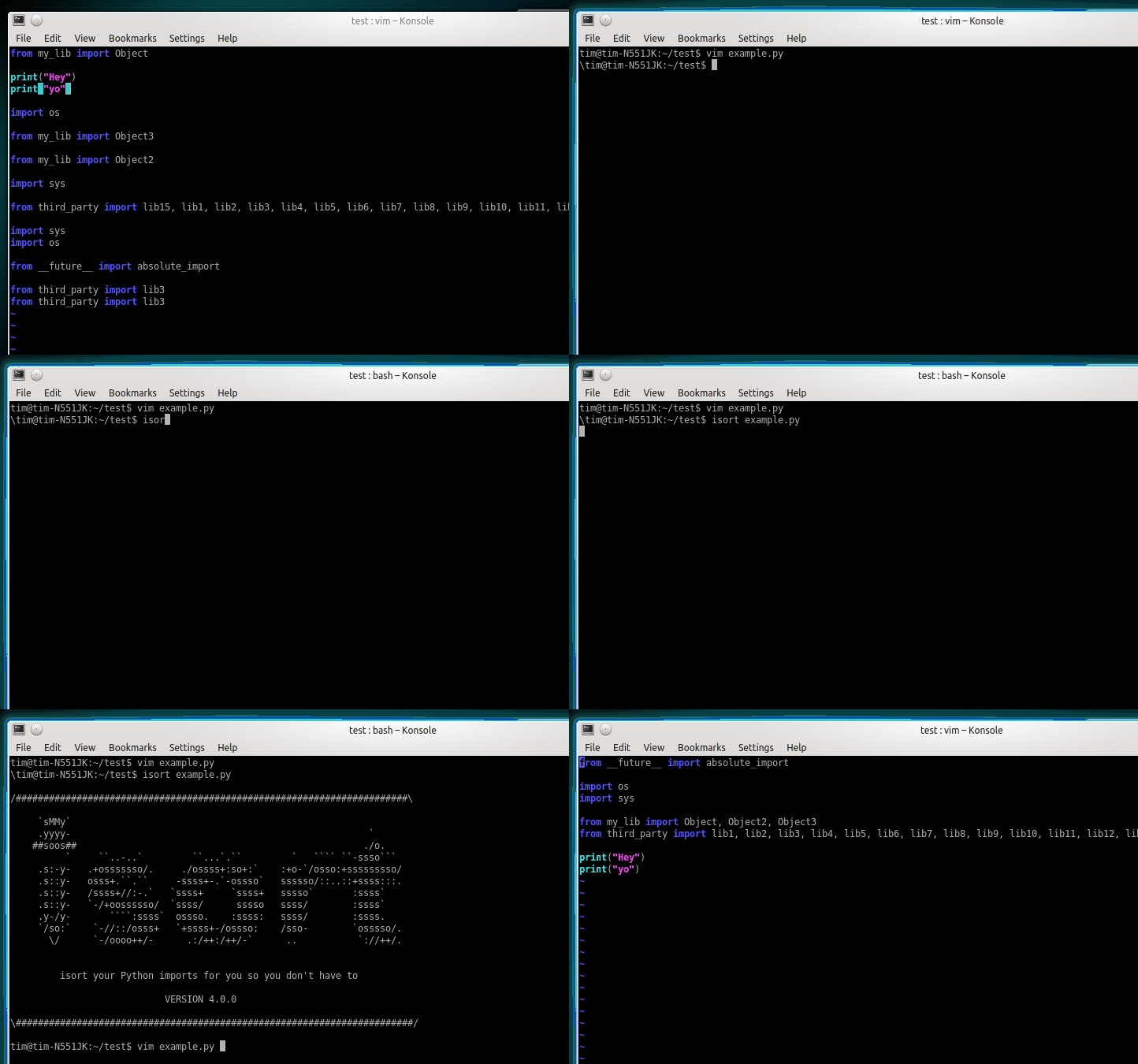
- Before isort:
- ```python
- from my_lib import Object
- import os
- from my_lib import Object3
- from my_lib import Object2
- import sys
- from third_party import lib15, lib1, lib2, lib3, lib4, lib5, lib6, lib7, lib8, lib9, lib10, lib11, lib12, lib13, lib14
- import sys
- from __future__ import absolute_import
- from third_party import lib3
- print("Hey")
- print("yo")
- ```
- After isort:
- ```python
- from __future__ import absolute_import
- import os
- import sys
- from third_party import (lib1, lib2, lib3, lib4, lib5, lib6, lib7, lib8,
- lib9, lib10, lib11, lib12, lib13, lib14, lib15)
- from my_lib import Object, Object2, Object3
- print("Hey")
- print("yo")
- ```
- ## Installing isort
- Installing isort is as simple as:
- ```bash
- pip install isort
- ```
- Install isort with requirements.txt support:
- ```bash
- pip install isort[requirements_deprecated_finder]
- ```
- Install isort with Pipfile support:
- ```bash
- pip install isort[pipfile_deprecated_finder]
- ```
- Install isort with both formats support:
- ```bash
- pip install isort[requirements_deprecated_finder,pipfile_deprecated_finder]
- ```
- ## Using isort
- **From the command line**:
- To run on specific files:
- ```bash
- isort mypythonfile.py mypythonfile2.py
- ```
- To apply recursively:
- ```bash
- isort .
- ```
- If [globstar](https://www.gnu.org/software/bash/manual/html_node/The-Shopt-Builtin.html)
- is enabled, `isort .` is equivalent to:
- ```bash
- isort **/*.py
- ```
- To view proposed changes without applying them:
- ```bash
- isort mypythonfile.py --diff
- ```
- Finally, to atomically run isort against a project, only applying
- changes if they don't introduce syntax errors:
- ```bash
- isort --atomic .
- ```
- (Note: this is disabled by default, as it prevents isort from
- running against code written using a different version of Python.)
- **From within Python**:
- ```python
- import isort
- isort.file("pythonfile.py")
- ```
- or:
- ```python
- import isort
- sorted_code = isort.code("import b\nimport a\n")
- ```
- ## Installing isort's for your preferred text editor
- Several plugins have been written that enable to use isort from within a
- variety of text-editors. You can find a full list of them [on the isort
- wiki](https://github.com/pycqa/isort/wiki/isort-Plugins).
- Additionally, I will enthusiastically accept pull requests that include
- plugins for other text editors and add documentation for them as I am
- notified.
- ## Multi line output modes
- You will notice above the \"multi\_line\_output\" setting. This setting
- defines how from imports wrap when they extend past the line\_length
- limit and has [12 possible settings](https://pycqa.github.io/isort/docs/configuration/multi_line_output_modes.html).
- ## Indentation
- To change the how constant indents appear - simply change the
- indent property with the following accepted formats:
- - Number of spaces you would like. For example: 4 would cause standard
- 4 space indentation.
- - Tab
- - A verbatim string with quotes around it.
- For example:
- ```python
- " "
- ```
- is equivalent to 4.
- For the import styles that use parentheses, you can control whether or
- not to include a trailing comma after the last import with the
- `include_trailing_comma` option (defaults to `False`).
- ## Intelligently Balanced Multi-line Imports
- As of isort 3.1.0 support for balanced multi-line imports has been
- added. With this enabled isort will dynamically change the import length
- to the one that produces the most balanced grid, while staying below the
- maximum import length defined.
- Example:
- ```python
- from __future__ import (absolute_import, division,
- print_function, unicode_literals)
- ```
- Will be produced instead of:
- ```python
- from __future__ import (absolute_import, division, print_function,
- unicode_literals)
- ```
- To enable this set `balanced_wrapping` to `True` in your config or pass
- the `-e` option into the command line utility.
- ## Custom Sections and Ordering
- isort provides configuration options to change almost every aspect of how
- imports are organized, ordered, or grouped together in sections.
- [Click here](https://pycqa.github.io/isort/docs/configuration/custom_sections_and_ordering.html) for an overview of all these options.
- ## Skip processing of imports (outside of configuration)
- To make isort ignore a single import simply add a comment at the end of
- the import line containing the text `isort:skip`:
- ```python
- import module # isort:skip
- ```
- or:
- ```python
- from xyz import (abc, # isort:skip
- yo,
- hey)
- ```
- To make isort skip an entire file simply add `isort:skip_file` to the
- module's doc string:
- ```python
- """ my_module.py
- Best module ever
- isort:skip_file
- """
- import b
- import a
- ```
- ## Adding or removing an import from multiple files
- isort can be ran or configured to add / remove imports automatically.
- [See a complete guide here.](https://pycqa.github.io/isort/docs/configuration/add_or_remove_imports.html)
- ## Using isort to verify code
- The `--check-only` option
- -------------------------
- isort can also be used to verify that code is correctly formatted
- by running it with `-c`. Any files that contain incorrectly sorted
- and/or formatted imports will be outputted to `stderr`.
- ```bash
- isort **/*.py -c -v
- SUCCESS: /home/timothy/Projects/Open_Source/isort/isort_kate_plugin.py Everything Looks Good!
- ERROR: /home/timothy/Projects/Open_Source/isort/isort/isort.py Imports are incorrectly sorted.
- ```
- One great place this can be used is with a pre-commit git hook, such as
- this one by \@acdha:
- <https://gist.github.com/acdha/8717683>
- This can help to ensure a certain level of code quality throughout a
- project.
- ## Git hook
- isort provides a hook function that can be integrated into your Git
- pre-commit script to check Python code before committing.
- [More info here.](https://pycqa.github.io/isort/docs/configuration/git_hook.html)
- ## Setuptools integration
- Upon installation, isort enables a `setuptools` command that checks
- Python files declared by your project.
- [More info here.](https://pycqa.github.io/isort/docs/configuration/setuptools_integration.html)
- ## Spread the word
- [](https://pycqa.github.io/isort/)
- Place this badge at the top of your repository to let others know your project uses isort.
- For README.md:
- ```markdown
- [](https://pycqa.github.io/isort/)
- ```
- Or README.rst:
- ```rst
- .. image:: https://img.shields.io/badge/%20imports-isort-%231674b1?style=flat&labelColor=ef8336
- :target: https://pycqa.github.io/isort/
- ```
- ## Security contact information
- To report a security vulnerability, please use the [Tidelift security
- contact](https://tidelift.com/security). Tidelift will coordinate the
- fix and disclosure.
- ## Why isort?
- isort simply stands for import sort. It was originally called
- "sortImports" however I got tired of typing the extra characters and
- came to the realization camelCase is not pythonic.
- I wrote isort because in an organization I used to work in the manager
- came in one day and decided all code must have alphabetically sorted
- imports. The code base was huge - and he meant for us to do it by hand.
- However, being a programmer - I\'m too lazy to spend 8 hours mindlessly
- performing a function, but not too lazy to spend 16 hours automating it.
- I was given permission to open source sortImports and here we are :)
- ------------------------------------------------------------------------
- [Get professionally supported isort with the Tidelift
- Subscription](https://tidelift.com/subscription/pkg/pypi-isort?utm_source=pypi-isort&utm_medium=referral&utm_campaign=readme)
- Professional support for isort is available as part of the [Tidelift
- Subscription](https://tidelift.com/subscription/pkg/pypi-isort?utm_source=pypi-isort&utm_medium=referral&utm_campaign=readme).
- Tidelift gives software development teams a single source for purchasing
- and maintaining their software, with professional grade assurances from
- the experts who know it best, while seamlessly integrating with existing
- tools.
- ------------------------------------------------------------------------
- Thanks and I hope you find isort useful!
- ~Timothy Crosley
|
